This guide explains how to enable RemindMe gadget notifications for the Finesse Call Center web application in Firefox and Chrome.
Enable Browser Notifications
- Log in to the Finesse web application.
- When prompted, allow the server to send notifications:
- In Firefox, click Allow Notifications.
- In Chrome, click Allow.
Note: You only need to enable notifications once per browser and device.
Firefox: 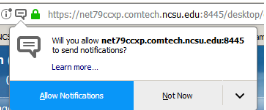
Chrome: 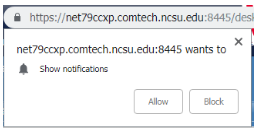
What to Expect After Enabling Notifications
After logging in, you may see a UCCX Finesse notification indicating that you are in a Not Ready state.
You will also hear an alert tone (ensure speakers or headphones are connected).
Firefox:
Chrome:
Notification Behavior
- When your Agent State changes to Ready, the notification automatically closes.
- If you miss a call while in the Ready state, the RemindMe notification will:
- Play an alert tone
- Display a message indicating you are in a Not Ready state
If you manually change your state to Not Ready, the notification will not appear.
The RemindMe notification appears only when:
- The call center system changes your status to Not Ready after a missed call.
Questions?
For assistance, email oit_ct_uc@help.ncsu.edu